MIDI
Samples
Preferences
Scope
Colour
Debug
Reference
1 — Welcome
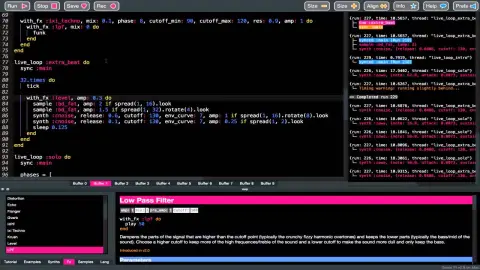
Welcome to Sonic Tau — a live-coding audio playground. The language is heavily inspired by Sonic Pi. Write code, hit Run, and hear it instantly. Modify code while it plays and hear changes in real-time.
This tutorial is adapted from the Sonic Pi tutorial by Sam Aaron. It’s divided into sections — feel free to dip in and out.
1.1 Live Coding
One of the most exciting aspects is that you can write and modify code live to make music, just like performing with a guitar. Let’s start with a beat:
4.times do sample :bd_haus, rate: 1 sleep 0.5 end
Press Run and you’ll hear a bass drum. Try changing sleep 0.5 to sleep 1 and hit Run again — the speed changes. That’s live coding!
Try layering sounds together:
4.times do sample :ambi_choir, rate: 0.3 sample :bd_haus, rate: 1 sleep 1 end
Play around — change rates, use negative values, try tiny sleep times. Comment out lines with # to remove them from the mix.
1.2 Learning through Play
There are no mistakes, only opportunities. No matter how experienced you are, unexpected outcomes happen. Take the sound, manipulate it and morph it into something awesome.
Start simple. Think of the simplest thing that would be fun, build it, play with it, and let new ideas emerge.
2 — Synths
Synth is short for synthesiser — something that creates sounds. Typically synths are complicated, but here you get that power in an approachable way.
2.1 Your First Beeps
This is where it all starts:
play 70
Lower numbers make lower pitched beeps, higher numbers make higher ones. The number 60 is middle C. Each +1 is one semitone up, so play 61 is C#, play 62 is D.
Play multiple notes at once for a chord:
play 72 play 75 play 79
Use sleep between notes for a melody:
play 72 sleep 1 play 75 sleep 1 play 79
Try shorter sleep values like 0.5 or 0.25 to speed things up. You can also use note names:
play :C sleep 0.5 play :D sleep 0.5 play :E
Add an octave number (:C3, :E4), sharps with s (:Fs3), and flats with b (:Eb3).
2.2 Synth Options: Amp and Pan
Options (opts) let you control the sound. Pass them after a comma:
play 60, amp: 0.5 sleep 0.5 play 60, amp: 2
amp: controls volume — 0 is silent, 1 is normal. Try to stay in 0–0.5 to avoid compression.
pan: controls stereo position — -1 is left, 0 is centre, 1 is right:
play 60, pan: -1 sleep 0.5 play 60, pan: 1
2.3 Switching Synths
The default beep is just one of many synths. Switch with use_synth:
use_synth :saw play 38 sleep 0.25 play 50 sleep 0.25 play 62
use_synth :prophet play 38 sleep 0.25 play 50 sleep 0.25 play 62
Combine them — play multiple synths at once by not sleeping between them:
use_synth :tb303 play 38 use_synth :dsaw play 50 use_synth :prophet play 57
Some favourites: :prophet, :dsaw, :fm, :tb303, :pulse
2.4 Duration with Envelopes
Sonic Pi uses ADSR amplitude envelopes to control sound duration and shape.
Release — how long the sound fades out (default 1 beat):
play 60, release: 2
Attack — how long to fade in (default 0):
play 60, attack: 2 sleep 3 play 65, attack: 0.5
Combine them:
play 60, attack: 0.7, release: 4
Sustain — hold at full volume between attack and release:
play 60, attack: 0.3, sustain: 1, release: 1
Decay — drop from attack level to sustain level:
play 60, attack: 0.1, attack_level: 1, decay: 0.2, sustain_level: 0.4, sustain: 1, release: 0.5
Total duration = attack + decay + sustain + release.
3 — Samples
Another great way to make music is with pre-recorded sounds — samples.
3.1 Triggering Samples
sample :ambi_lunar_land
Layer samples with notes — they play simultaneously unless separated by sleep:
sample :ambi_lunar_land sleep 1 play 48 sleep 0.5 play 36 sample :ambi_drone sleep 1 play 36
Discover samples by typing a category prefix like :ambi_, :bass_, :elec_, :perc_, :guit_, :drum_, :misc_, or :bd_ and using autocomplete.
3.2 Sample Parameters
Samples accept the same opts as synths. Control amplitude and panning:
sample :ambi_lunar_land, amp: 0.5
sample :loop_amen, pan: -1 sleep 0.877 sample :loop_amen, pan: 1
| Sound | play synth sample use_synth |
| Timing | sleep use_bpm |
| Pitch | use_transpose use_octave |
| Flow | N.times if define in_thread live_loop stop |
| Random | rand rrand rrand_i rand_i dice use_random_seed |
| Theory | chord scale note range |
| Lists | .choose .shuffle |
| State | @name = @name set get cue sync |
| Output |
Sound
play note, amp: release: cutoff: ...
Play a note with the current synth. Accepts MIDI numbers or note symbols. Code continues executing while the sound plays through its envelope.
play 60 sleep 0.5 play :E4, amp: 0.5, release: 2
synth :synth_name, note: amp: release: ...
Trigger a specific synth by name. Unlike use_synth, this doesn’t change the default — it’s a one-shot. The note is passed as a note: kwarg (default: 52 / E3).
synth :prophet, note: 60, release: 2 sleep 0.5 synth :tb303, note: 36, cutoff: 80
sample :name, rate: amp: pan: ...
Trigger a sample. Play back a recorded sound file. Use a built-in sample name like :bd_haus or a full path string. There are many opts for manipulating playback — rate: affects speed and pitch, amp: controls volume. You can also filter samples from a directory by passing string keywords and an optional index.
sample :loop_amen sleep 1 sample :ambi_drone, rate: 0.5, amp: 0.3 -- filter by directory and keyword sample :drum "kick" sample :drum "snare" 2, rate: 0.8
use_synth :synth_name
Set the default synth for all subsequent play calls.
use_synth :saw play 50 sleep 0.5 use_synth :prophet play 50
Timing
sleep beats
Wait for a number of beats before the next command. Beats are scaled to seconds by the current BPM.
play 60 sleep 1 play 67 sleep 0.5 play 72
use_bpm bpm
Set the tempo in beats per minute. Affects all subsequent sleep calls and temporal synth arguments.
use_bpm 120 play 60 sleep 1 play 67
Pitch
use_transpose semitones
Shift all notes by the given number of semitones. Use negative numbers to shift down.
play 60 sleep 0.5 use_transpose 7 play 60
use_octave octaves
Shift all notes by the given number of octaves (each octave = 12 semitones).
play 60 sleep 0.5 use_octave -1 play 60
Control Flow
N.times do … end
Repeat a block of code N times.
4.times do sample :bd_haus sleep 0.5 end
if condition … else … end
Conditional execution. Run code only when a condition is true.
if dice(6) > 3 play 72 else play 60 end
define :name do … end
Give a block of code a name for re-use. Call it like any other function.
define :bass do use_synth :tb303 play 36, release: 0.3, cutoff: 70 end bass sleep 0.5 bass
in_thread do … end
Run a block of code in a new thread. The parent continues immediately while the child runs concurrently. Each thread has its own timing, so sleep in one thread doesn’t block the other.
in_thread do
4.times do
sample :bd_haus, lpf: 90
sleep 0.5
end
end
in_thread do
16.times do
n = [52, 55, 57, 59, 62, 64].choose
synth :chiplead, note: n, release: 0.1
sleep 0.125
end
end
8.times do
sample :hat_bdu
sleep 0.25
end
live_loop :name do … end
A loop for live coding. Runs the body repeatedly, automatically looping back to the start when it reaches end. If you edit the code and re-run, the new version hot-swaps into the running loop — no need to stop and restart. Each iteration automatically emits a cue at /live_loop/name so other threads can sync with it. Every live loop must contain at least one sleep to avoid spinning.
live_loop :beat do sample :bd_haus, lpf: 100 sleep 0.5 end live_loop :melody do use_synth :subpulse play [50, 54, 57, 62, 74].choose, release: 0.2 sleep 0.125 end
stop
Stop the current thread or run. Does not stop any running synths triggered previously in the thread. Useful for conditionally silencing a live loop on some iterations.
play 70 sleep 0.5 play 72 stop play 745
Randomisation
rand (max)
Random float between 0 and max (default 1).
8.times do play 72 + rand(24), release: 0.1 sleep 0.125 end
rrand (min, max)
Random float between min and max.
8.times do play rrand(48, 72) sleep 0.25 end
rrand_i (min, max)
Random integer between min and max (inclusive).
8.times do play rrand_i(48, 72) sleep 0.25 end
rand_i (max)
Random integer between 0 and max−1.
4.times do sample :elec_blip, rate: rand_i(4) sleep 0.25 end
dice (n)
Roll a dice with N sides (default 6). Returns integer from 1 to N.
4.times do play 50 + dice(12) sleep 0.25 end
use_random_seed seed
Set the random seed for reproducible sequences. The same seed always produces the same random numbers.
use_random_seed 42 4.times do play rrand_i(50, 80) sleep 0.25 end use_random_seed 100 4.times do play rrand_i(50, 80) sleep 0.25 end use_random_seed 42 4.times do play rrand_i(50, 80) sleep 0.25 end
Music Theory
chord (:root, :type)
Create a list of MIDI notes forming a chord. The root can be a note symbol or MIDI number. Supports major, minor, 7th, 9th, 11th, 13th, sus, dim, aug, and many more.
play chord(:E3, :minor).choose sleep 0.25 play chord(:C4, :major).choose sleep 0.25 play chord(:A3, :dom7).choose
scale (:root, :type)
Create a list of MIDI notes forming a scale. Supports major, minor, pentatonic, blues, modes, and many exotic scales.
8.times do play scale(:C4, :minor_pentatonic).choose, release: 0.1 sleep 0.125 end
note (:symbol)
Convert a note symbol to its MIDI number. Supports sharps (s), flats (b/f), and octave numbers.
print note(:C4) print note(:Eb3) play note(:Fs4)
range (start, end, step)
Create a list of numbers from start to end, incrementing by step.
8.times do play range(50, 74, 3).choose, release: 0.1 sleep 0.125 end
Lists
[].choose
Pick a random element from a list.
4.times do play [60, 64, 67, 72].choose sleep 0.25 end
[].shuffle
Return a new list with elements in random order.
print [60, 64, 67, 72].shuffle
Time State
@name = value
Store information in Time State for the current time. The value is visible to all threads and will remain until overwritten. Shorthand for set :name, value.
@note = 60 play @note sleep 0.5 @note = 72 play @note
@name
Retrieve information from Time State set prior to the current time from any thread. Returns 0 if no value has been stored. Shorthand for get :name.
@root = 50 8.times do play @root + rrand_i(0, 12), release: 0.1 sleep 0.125 end
set :name, value
Store information in Time State. The value will remain until overwritten by another call to set. Also triggers any threads waiting on sync :name.
set :root, 60 4.times do play get(:root), release: 0.2 sleep 0.25 end set :root, 72 4.times do play get(:root), release: 0.2 sleep 0.25 end
get :name
Retrieve information from Time State. Returns the most recent value stored with set prior to the current time. Returns 0 if not set.
set :notes, [50, 54, 57, 62] 8.times do play get(:notes).choose, release: 0.1 sleep 0.125 end
cue :name
Cue other threads. Send a heartbeat synchronisation message containing the virtual timestamp of the current thread. Any thread waiting on sync :name will wake up and inherit this thread’s beat. Unlike set, cues are for signalling — they don’t store a retrievable value.
in_thread do sleep 1 cue :drop end sync :drop sample :bd_haus play 36, release: 2
sync :name
Sync with other threads. Pause the current thread until a matching cue, set, or live_loop event is received. When matched, the current thread’s virtual time is set to match the cueing thread — synchronising them musically.
live_loop :beat do sample :bd_haus, lpf: 100 sleep 0.5 end live_loop :melody do sync :beat use_synth :chiplead play [50, 54, 57, 62].choose, release: 0.1 end
Output
print value
Display a value in the output pane. Useful for debugging.
print 42 print rrand(0, 100) print "hello"
Quick jump:
Classic
:beep
A simple pure sine wave. The default synth.
play 60
:saw
A saw wave with a low pass filter.
use_synth :saw play 50, release: 1
:square
A simple square wave with a low pass filter.
use_synth :square play 50, release: 1
:tri
A simple triangle wave with a low pass filter.
use_synth :tri play 60, release: 1
:pulse
A simple pulse wave with a low pass filter. Adjustable pulse width.
use_synth :pulse play 52, pulse_width: 0.3, release: 1
:subpulse
A pulse wave with a sub sine wave passed through a low pass filter.
use_synth :subpulse play 40, release: 1
:prophet
Dark and swirly, this synth uses Pulse Width Modulation (PWM) to create a timbre which continually moves around. This effect is created using the pulse ugen which produces a variable width square wave.
use_synth :prophet play 60, release: 2
:hollow
A hollow breathy sound constructed from random noise
use_synth :hollow play 60, release: 3
:dark_ambience
A slow rolling bass with a sparkle of light trying to escape the darkness. Great for an ambient sound.
use_synth :dark_ambience play 48, release: 4
:growl
A deep rumbling growl with a bright sine shining through at higher notes.
use_synth :growl play 40, release: 1
:zawa
Saw wave with oscillating timbre. Produces moving saw waves with a unique character controllable with the control oscillator (usage similar to mod synths).
use_synth :zawa play 55, release: 2
Detuned
:dsaw
A pair of detuned saw waves passed through a low pass filter.
use_synth :dsaw play 50, detune: 0.3, release: 1.5
:dpulse
A pair of detuned pulse waves passed through a low pass filter.
use_synth :dpulse play 48, detune: 0.2, release: 1
:dtri
A pair of detuned triangle waves passed through a low pass filter.
use_synth :dtri play 55, detune: 0.3, release: 1.5
:supersaw
Thick swirly saw waves sparkling and moving about to create a rich trancy sound.
use_synth :supersaw play 50, release: 2
Bass
:tb303
Emulation of the classic Roland TB-303 Bass Line synthesiser.
use_synth :tb303 play 40, cutoff: 80, release: 0.5
:bass_foundation
A soft bass synth inspired by the sounds of the 80s.
use_synth :bass_foundation play 36, release: 1
:bass_highend
An addition to the :bass_foundation synth inspired by the sounds of the 80s.
use_synth :bass_highend play 40, release: 1
:gabberkick
An aggressive Gabber synth sound.
use_synth :gabberkick play 36, release: 0.5
Keys & Bells
:rhodey
The sound of an electric piano from the 60's and 70's, producing a characteristic metallic sound.
use_synth :rhodey play 60, release: 1.5
:dull_bell
A simple dull discordant bell sound.
use_synth :dull_bell play 60
:pretty_bell
A pretty bell sound.
use_synth :pretty_bell play 72
:kalimba
A synthesised kalimba (a type of African thumb piano).
use_synth :kalimba play 72
:pluck
A basic plucked string synthesiser that uses Karplus-Strong synthesis.
use_synth :pluck play 60, release: 1
Modulated
:fm
A sine wave with a fundamental frequency which is modulated at audio rate by another sine wave with a specific modulation, division and depth. Useful for generating a wide range of sounds by playing with the divisor and depth params.
use_synth :fm play 60, divisor: 2, depth: 3, release: 1.5
:mod_saw
A saw wave passed through a low pass filter which modulates between two separate notes via a variety of control waves.
use_synth :mod_saw play 50, mod_rate: 4, release: 2
:mod_sine
A sine wave passed through a low pass filter which modulates between two separate notes via a variety of control waves.
use_synth :mod_sine play 60, mod_rate: 2, release: 2
:mod_pulse
A pulse wave with a low pass filter modulating between two notes via a variety of control waves (see mod_wave: arg). The pulse wave defaults to a square wave, but the timbre can be changed dramatically by adjusting the pulse_width arg between 0 and 1.
use_synth :mod_pulse play 52, mod_rate: 3, release: 1.5
:mod_tri
A triangle wave passed through a low pass filter which modulates between two separate notes via a variety of control waves.
use_synth :mod_tri play 60, mod_rate: 5, release: 2
:mod_dsaw
A pair of detuned saw waves (see the dsaw synth) which are modulated between two fixed notes at a given rate.
use_synth :mod_dsaw play 48, mod_rate: 2, release: 2
:mod_fm
The FM synth modulating between two notes - the duration of the modulation can be modified using the mod_phase arg, the range (number of notes jumped between) by the mod_range arg and the width of the jumps by the mod_width param. The FM synth is a sine wave with a fundamental frequency which is modulated at audio rate by another sine wave with a specific modulation, division and depth.
use_synth :mod_fm play 55, mod_rate: 3, release: 1.5
:mod_beep
A sine wave passed through a low pass filter which modulates between two separate notes via a variety of control waves.
use_synth :mod_beep play 60, mod_rate: 2, release: 2
Chip & Retro
:chipbass
A 16 step triangle wave modelled after the 2A03 chip found in voice 3 of the NES games console. This can be used for retro sounding basslines.
use_synth :chipbass play 36, release: 0.5
:chiplead
A slightly clipped square (pulse) wave with phases of 12.5%, 25% or 50% modelled after the 2A03 chip found in voices 1 and 2 of the NES games console. This can be used for retro sounding leads and harmonised lines.
use_synth :chiplead play 72, release: 0.3 sleep 0.25 play 74, release: 0.3 sleep 0.25 play 76, release: 0.5
:chipnoise
Generates noise whose values are either -1 or 1 (like a pulse or square wave) with one of 16 particular frequencies. This is similar to the noise channel on the 2A03 chip used in the NES games console, although it lacks the same Pseudo-Random Number Generator (PRNG) and doesn't implement the 2A03's lesser used noise mode.
use_synth :chipnoise play 60, release: 0.15
Other
:blade
Straight from the 70s, evoking the mists of Blade Runner, this simple electro-style string synth is based on filtered saw waves and a variable vibrato.
use_synth :blade play 55, release: 1.5
:tech_saws
Slightly modified supersaw implementation based on http://sccode.org/1-4YS
use_synth :tech_saws play 52, release: 2
:hoover
Classic early 90's rave synth - 'a sort of slurry chorussy synth line like the classic Dominator by Human Resource'. Based on Dan Stowell's implementation in SuperCollider and Daniel Turczanski's port to Overtone.
use_synth :hoover play 40, release: 1.5
:rodeo
Classic 70's electric piano sound, with built-in compressor and chorus.
use_synth :rodeo play 60, release: 1
:organ_tonewheel
An emulation of a tonewheel organ with an optional rotary speaker. These instruments were the first electro-mechanical synthesisers, developed in the mid 1930s by Laurens Hammond.
use_synth :organ_tonewheel play 60, release: 2
Noise
:noise
White noise — equal energy at every frequency, comparable to radio static.
use_synth :noise play 60, release: 0.5
:pnoise
Pink noise — spectrum falls off in power by 3 dB per octave.
use_synth :pnoise play 60, release: 0.5
:bnoise
Brown noise — spectrum falls off in power by 6 dB per octave.
use_synth :bnoise play 60, release: 0.5
:gnoise
Grey noise — results from flipping random bits in a word.
use_synth :gnoise play 60, release: 0.5
:cnoise
Clip noise — values are either -1 or 1.
use_synth :cnoise play 60, release: 0.5
SC808 Drum Machine
:sc808_bassdrum
SC808 bass drum.
synth :sc808_bassdrum
:sc808_snare
SC808 snare drum.
synth :sc808_snare
:sc808_clap
SC808 clap.
synth :sc808_clap
:sc808_closed_hihat
SC808 closed hi-hat.
synth :sc808_closed_hihat
:sc808_open_hihat
SC808 open hi-hat.
synth :sc808_open_hihat
:sc808_cymbal
SC808 cymbal.
synth :sc808_cymbal
:sc808_cowbell
SC808 cowbell.
synth :sc808_cowbell
:sc808_rimshot
SC808 rimshot.
synth :sc808_rimshot
:sc808_claves
SC808 claves.
synth :sc808_claves
:sc808_maracas
SC808 maracas.
synth :sc808_maracas
:sc808_tomlo
SC808 low tom.
synth :sc808_tomlo
:sc808_tommid
SC808 mid tom.
synth :sc808_tommid
:sc808_tomhi
SC808 high tom.
synth :sc808_tomhi
:sc808_congalo
SC808 low conga.
synth :sc808_congalo
:sc808_congamid
SC808 mid conga.
synth :sc808_congamid
:sc808_congahi
SC808 high conga.
synth :sc808_congahi
Quick jump by category: